Boat Beacon now supports AIS and GPS from a VHF AIS receiver.

Boat Beacon now allows you to use AIS and GPS NMEA data directly from an AIS receiver and GPS on-board your boat via WiFi (over UDP or TCP) or Serial(USB). Boat Beacon seamlessly combines this with the AIS information it receives over the internet. If  you travel outside mobile internet coverage or in an area where we don’t have good coverage from a local shore station, Boat Beacon can now continue to work displaying live ship data, calculating Closest Point of Approach (CPA) with alarms etc. from your VHF AIS receiver or AIS enabled VHF radio. On Android you can connect  the  NMEA  serial  or usb output from an AIS receiver or connect via WiFi. On iPhone you need to use WiFi. Here are some of the AIS receivers we have tested with  Lowrance, Simrad, B&G, Digital Yacht, Comar NMEA-w2-Wifi, Weatherdock EasyAIS, Chetco Digital SeaSmart , dAISy AIS, Navico GoFree, Quark AIS (dual channel and usb stick)  etc. More information on how to hook all this up is given below.

 iPhone and Android AIS and GPS over WiFi.

If you already have AIS data available over Wifi on board then just enter the UDP port number (or ip address and port number for TCP) for the source and Boat Beacon will start using the data. With Navico GoFree and iPhone/iPad this is even more simple as there is a “GoFree” connect button in settings – just press and go.  If you only have a usb or nmea output available you will also need a serial or usb to internet or Wifi adaptor. They range in price from $50 to $200. This is one example we have tested with at the $70 level – USR-TCP232-400 that we hook into our on-board WiFi hub.

Here are some specific instructions for connecting Boat Beacon on Android to GoFree – https://pocketmariner.com/?p=1538

Android AIS NMEA 0183 and GPS over USB or serial

Boat Beacon will automatically launch and use local AIS  data (and GPS if available)  when a USB cable is plugged in between the AIS receiver and your Android device. You can set the USB mode on or off in settings in Boat Beacon.

For an Android NMEA 0183 connection you will need the following:-

1. An Android device that supports USB host mode (typically OS3 or later)
2. If your receiver doesn’t have a USB output you can simply convert the NMEA 0183 2 wire  output to USB for a few dollars more using an RS232 to USB cable. Typically $7 or so.  The most common USB to RS232 cables use the Prolific 2303 driver which we support. The cable we tested with is this one :-
We also support many other serial usb drivers (see below).
3. You will also need an Android OTG micro usb adaptor which only cost a couple of dollars. Here are a couple of links to the type of OTG micro usb adapter you will need:-
and this one allows you to charge your device at the same time:-
20 cm Micro USB OTG Y-Cable + extra power supply http://www.amazon.co.uk/dp/B00EJP5XR2/ref=cm_sw_r_tw_awdl_adfhtb0B8YQ4B via @amazon

More information.

You can get Boat Beacon from the iTunes or Android stores – Boat Beacon

If you have a problem connecting with Android over usb you can run this free simple serial usb tester program on your Android device once you have an OTG adaptor to report and test what driver is required and let us know :-
http://boatbeaconapp.com/ybw/app/usbtest.apk (just click on the link on your tablet to download the app).
Please email us if you have any questions or suggestions at support@pocketmariner.com
There is also a great article here about hooking up NMEA to serial :- http://cms.nobeltec.com/CMS/Files/Connecting%20instrument%20serially%20to%20the%20computer.pdf


Improved Live AIS coverage in Australia for Boat Beacon and Boat Watch

Thanks to the help of the Australian Volunteer Coastguard (AVCG) and Australian Navigation and Communications company, Electrotech we now have much improved real-time AIS coverage in Australia.

9 new stations are feeding us AIS data live directly from Sydney, Brisbane (3), Gladstone, Melbourne, Karratha, Cairns and Darwin.

We have been working on a pro-bono basis with the AVCG  in Mooloolaba, Brisbane to provide enhancements to Boat Beacon to support their world leading computer based Radio logging service. Boat Beacon now enables users to automatically “login” their boat and trip details including MMSI, Destination, ETA and Persons on board when they start a trip and “logout” again when they arrive by simply tapping the Boat Beacon Sailboat icon at the bottom left to start and stop sailing mode. We have provided these enhancements for free and AVCG , Mooloolaba are recommending Boat Beacon for use with  their Radio logging service (click the link to see the video about it).


Here’s a screenshot from Boat Beacon showing the Alexander Passenger ship right now in  Sydney, last update 20s ago!


Win B&G Zeus Touch 7, iPad Mini, Pebble Watch and SeaNav

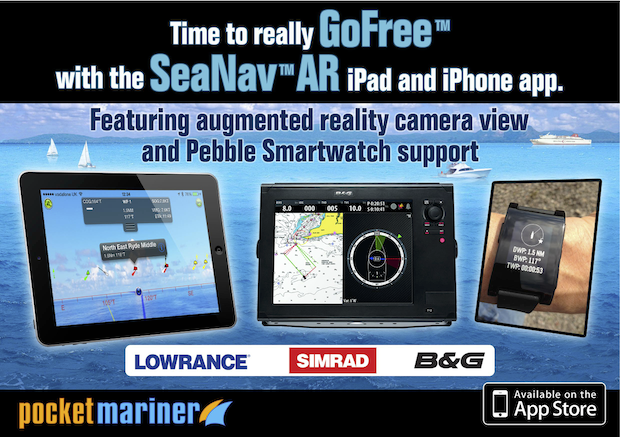
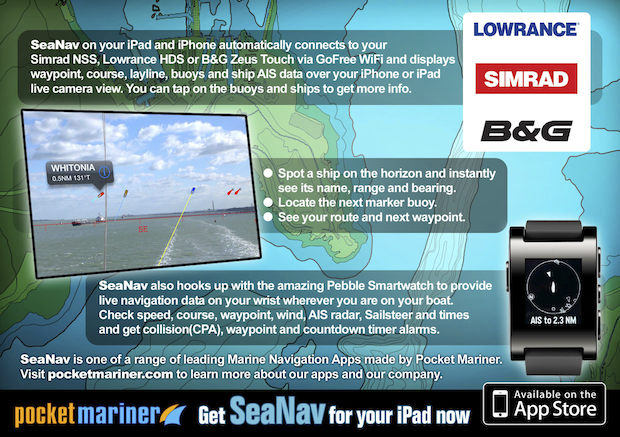
Your chance to win an awesome package we have put together with our SeaNav app and B&G.  SeaNav automatically hooks up with the B&G Zeus Touch over WiFi and uses the navigation data from their system (gps, course, wind, speed, lay lines, depth, AIS etc.) to display in SeaNav and on the Pebble SmartWatch with our free Pebble SeaNav app. Check out the competition details here


SeaNav and Simrad,Lowrance and B&G GoFree at METS.

SeaNav now hooks up with Simrad, Lowrance and B&G MFD’s via WiFi GoFree  and can use all the live navigation data including Position, AIS, Wind and Depth to display on your iPhone , iPad or Pebble Smartwatch wherever you are on your boat. We’ll be at the METS trade show in Amsterdam November 19th -21st . Come and see for yourself and try out the Pebble Smartwatch too – METS 2013 – stand(s):01.120, 01.147